# แก้ปัญหาเปลี่ยนภาษาใน Adobe Acrobat Reader แล้วค้าง

#### 1. เปิดโปรแกรม **Adobe Acrobat Reader** ขึ้นมา (ไม่ต้องเปิดไฟล์ PDF ก็ได้)

#### 2. ไปที่เมนู **Menu** ที่มุมซ้ายบนสุด หรือ **Edit** (แก้ไข) --&gt; เลือก **Preferences** (การตั้งค่า)

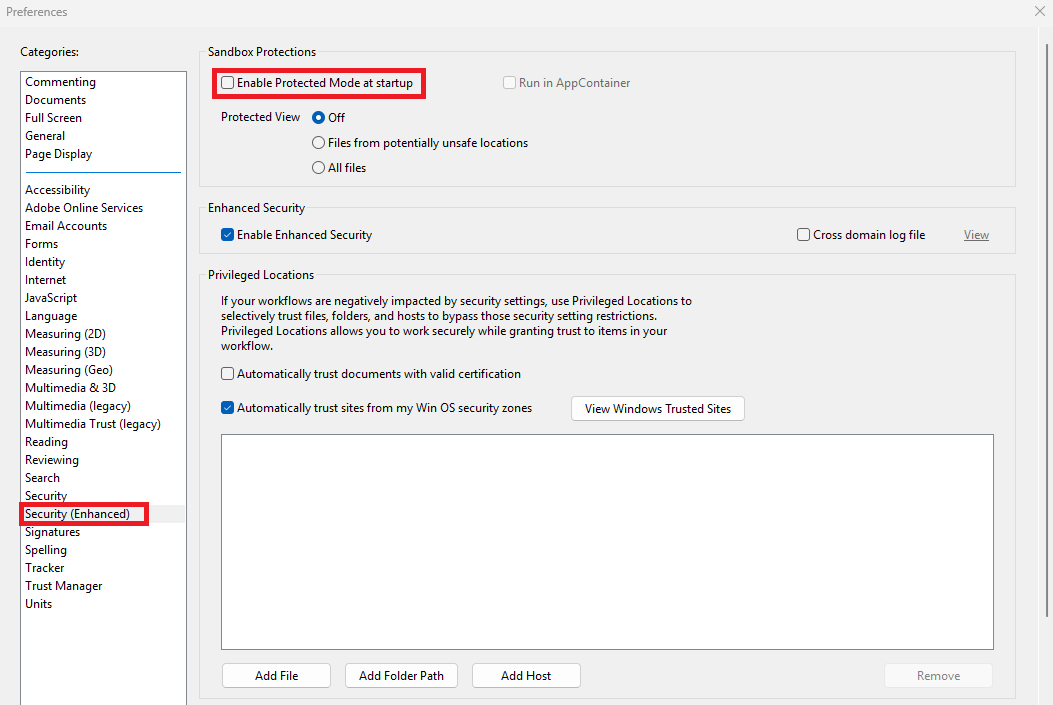
#### 3. ในแถบด้านซ้าย คลิกที่หัวข้อ **Security (Enhanced)**

#### <span class="rQesXe MPyX">4. </span><span class="iNqyIf" data-complete="true" data-copy-service-computed-style="font-family: "Google Sans", Arial, sans-serif, "Noto Color Emoji"; font-size: 16px; font-weight: 400; margin: 0px; text-decoration: none; border-bottom: 0px rgb(10, 10, 10);" data-sfc-cp="" data-sfc-root="ep">ในส่วนของ **Sandbox Protections**:</span>

- #### <span class="iNqyIf" data-complete="true" data-copy-service-computed-style="font-family: "Google Sans", Arial, sans-serif, "Noto Color Emoji"; font-size: 16px; font-weight: 400; margin: 0px; text-decoration: none; border-bottom: 0px rgb(10, 10, 10);" data-sfc-cp="" data-sfc-root="ep">นำเครื่องหมายถูกออกจากหน้าช่อง **Enable Protected Mode at startup**</span>

[![11.png](https://support.ambrosewine.com/uploads/images/gallery/2026-09/scaled-1680-/11.png)](https://support.ambrosewine.com/uploads/images/gallery/2026-09/11.png)

#### 5. คลิกปุ่ม **OK** ด้านล่างสุด เพื่อบันทึกค่าถาวร จากนั้นปิดแล้วเปิดโปรแกรมใหม่อีกครั้ง